You have been at the table twenty minutes. The third dozen has not come in for what feels like forever, red has been landing in clumps, and something in you says there is a window here — right now — if you could just see it properly.
That instinct is usually half right. There is something there: a real, measurable lopsidedness in what this table has produced tonight. The half that is wrong is what it predicts. The distance between those two halves is exactly what the VIPER tracker is built to show you, and it is worth learning to read properly, because the same screen that tells you a swing is running will also tell you, honestly, that the wheel has not noticed.
Two windows do the work. The buttons for both sit at the bottom of the main VIPER window: Table Insights and Trigger Monitor. Neither one bets. Neither one is required for a session to run. They are instruments.
The Trigger Monitor, at a glance
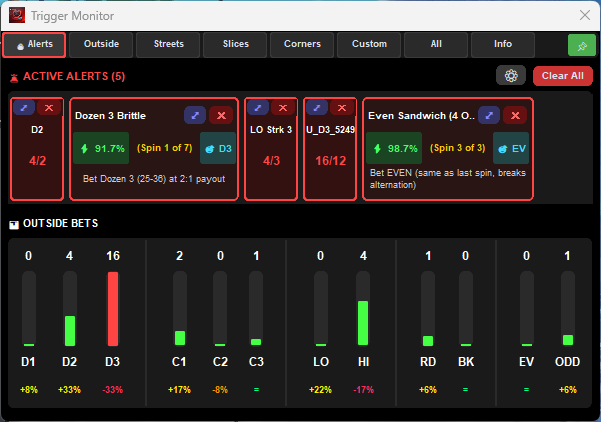
Eight tabs across the top: Alerts, Outside, Streets, Slices, Corners, Custom, All, Info. The Alerts tab is the one you will live on, and the strip of bars underneath it is on that tab permanently, because it is the fastest read in the app.
The candlestick row
Twelve columns, grouped the way you think about them: D1 D2 D3, then C1 C2 C3, then LO HI, RD BK, EV OD. Each column is three pieces of information stacked.
The number on top is rounds since that bet last hit. In the shot above, D3 is on 16 and D1 has just landed.
The bar is that count measured against the trigger threshold set for that bet — not against some universal scale. It is green below 80% of the threshold, amber from 80%, and red once the count reaches it. A red bar and a fired alert are the same event seen two ways.
The percentage underneath is the one people miss, and it is the most useful number on the screen. It is not a miss count. It is how far that bet's actual hits have drifted from its expected share of the whole session so far. D2 at +33% has come in a third more often than the arithmetic says it should have. D3 at -33% has come in a third less.
| Deviation shown | Colour | What it means |
|---|---|---|
= or under ±5% | green | Running to form |
| +5% or more | yellow | Over its share |
| -5% to -15% | orange | Under its share |
| worse than -15% | red | Well under its share |
— | grey | Not enough spins to say anything yet |
That last row matters more than the others. VIPER will not colour a deviation until the bet has accumulated at least five expected hits, because below that the percentage is noise wearing a number's clothing. The threshold scales with how often the bet should land: about 11 spins for an even-money bet, 16 for a dozen or a column, 31 for a double street, and 62 for a single street. Until then the column shows a dash. If you have just sat down, expect a row of dashes, and do not read anything into their absence.
The alert cards
Above the bars, the alerts themselves. Two kinds.
Compact cards are a name and a fraction: D2 over 4/2 means that trigger's count is 4 against a threshold of 2. U_D3_5249 with 16/12 is a trigger you built yourself. That is the whole card, and for a simple miss or streak count it is the whole story.
Wide cards carry a trigger that was researched rather than merely counted, and they show their working:
- A probability badge —
⚡ 91.7%on the Dozen 3 Brittle card. - A spin counter —
(Spin 1 of 7). This is a countdown, not a tally. The alert holds for the full window, and the number tells you how much of it is left. - A bet chip —
D3— and a plain-English line: Bet Dozen 3 (25-36) at 2:1 payout.
The card's border tells you where it is in its own life: amber from 80% of its threshold, red once it has fired, and blue for a compound trigger, which is a different animal covered further down.
One detail worth knowing before you click anything. The ✕ on a card does not hide it — it resets that trigger's counter to zero. So does Clear All, for every alert currently showing. That is the right behaviour when you have taken the shot and want a clean slate, and the wrong behaviour when you are tidying the screen mid-window. There is no undo.
The ⤢ opens the alert in its own detail window, which is the safe way to get a closer look.
The pattern cards hold their window
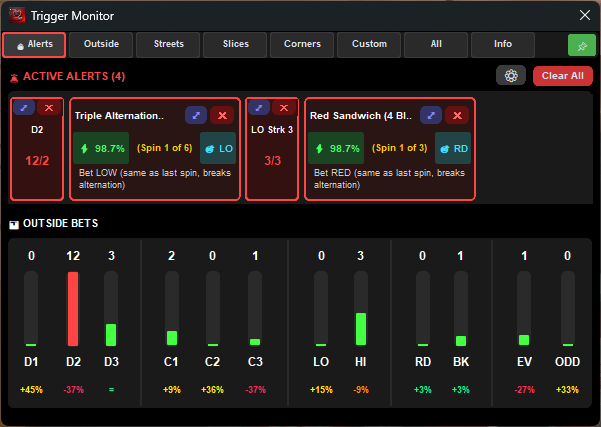
Pattern alerts behave differently from miss alerts, and this trips people up. When a pattern fires, VIPER locks the recommendation for the whole spins_to_break window and holds the card up even if the pattern breaks on the next spin. The card in the second shot reading (Spin 3 of 3) is on its final spin.
This is deliberate. The recommendation was made on the basis of a whole window, so changing it halfway would be answering a different question than the one the trigger asked. It also means a card that is still on screen is not necessarily a live opportunity — check the spin counter, not the colour.
The other tabs
Outside is the same twelve columns with more room and the deviation read-outs enlarged.
Streets is 12 streets and 11 double streets, each with the same miss count, bar and deviation. Hover a street's label to see which numbers it covers. Street deviations stay grey for about 62 spins, so this tab is for a session that has been running a while.
Corners covers the 22 corners. Slices shows wheel-section triggers — quadrants, halves, and the French sections. Custom shows triggers you defined yourself.
All is every active trigger in one list, firing or not, which is the tab to use when you want to know why nothing is firing.
Info is not a tracker tab at all — it is the AutoBet message log, timestamped. If a bet did not go on and you want to know why, it is in here.
Table Insights: the wheel
The tracker counts the layout. Table Insights draws the wheel, and the wheel is where a session's geography shows up.
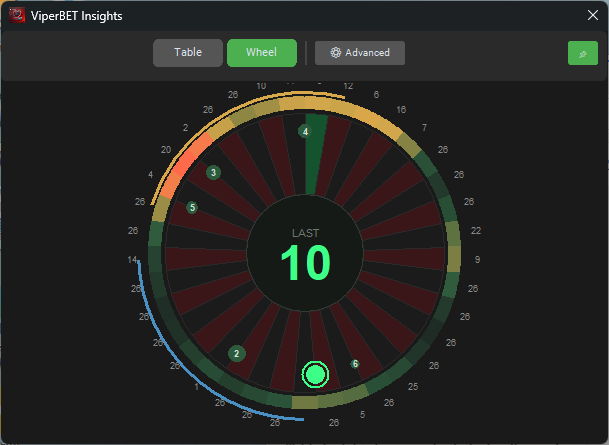
Five things are drawn on it.
The heat band — the coloured ring around the rim. Each pocket is scored by recency-weighted hits, then smoothed across its two neighbours either side. The smoothing is the point: a single pocket lands about once in 37 spins, so raw per-pocket counts on a session's worth of data are pure noise. Smoothed into regions, they become readable. The ramp runs dark green (quiet) through gold to orange (busy). A Heat memory slider sets how many spins it takes for a hit to fade to half its weight — 40 by default, adjustable from 8 to 120. Drop it to 15 and the band shows you the last twenty minutes; push it to 120 and it shows the whole night.
The running arc (gold) and the sleeping arc (blue). VIPER slides a window of adjacent pockets around the wheel and marks the run with the most hits and the run with the fewest, over the last 80 spins. Both default to 9 pockets wide — roughly a quarter of the wheel — and both are adjustable from 1 to 18. Neither arc is drawn until at least 10 spins are in.
The comet — the last six spins as dots at their pocket positions, newest ringed in green, the rest numbered 2 to 6 and fading. This is the part you actually watch. It answers "is the ball landing near itself?" faster than any number can.
The repeat signal — gold rings on a pocket, and a banner, when the same number has just come in twice running. The banner counts down: the signal clears itself after two spins, because that is how long the effect it is built on lasts. More on that below.
The hub shows LAST and the number that just landed.
An Advanced panel behind the button on the header adds five more overlays — pocket numbers, miss counts, your trigger sectors drawn as slices, hot/cold pocket shading, and the threshold editor. All of those ship off. They were turned off by default because a wheel carrying every overlay at once is a wheel you stop looking at.
Table Insights: the table
The Table tab is the same data on the betting layout. Streets, double streets, corners, splits, dozens and columns can each be overlaid and coloured:
- Ice blue — cold. The bet has missed more than its cold threshold.
- Gold — warm. It is past 60% of the way there.
- Red — hot. It has hit at least twice inside the recent window.
Cold beats hot when a bet somehow qualifies as both. The thresholds ship at roughly three to four times each bet's expected gap, which is where "unusual" starts being worth a second look:
| Bet | Cold at | Expected gap |
|---|---|---|
| Single number | 74 misses | ~37 |
| Split | 55 | ~18.5 |
| Street | 37 | ~12.3 |
| Corner | 28 | ~9.25 |
| Double street | 18 | ~6.2 |
| Dozen / column | 12 | ~3.1 |
Every one of those is editable, and the Thresholds card in Advanced is where you edit them.
The pre-programmed triggers
VIPER ships 63 trigger profiles holding 258 triggers. 22 profiles — 108 triggers — are on by default, which is why your board has alerts on it the first time you open it without having configured anything.
They come in five mechanical types:
Miss (75 triggers) — a bet has not hit for N rounds. Red Miss Alert at 9, Even Miss Alert at 8, the three Brittle Dozens at 10.
Streak (9) — a bet has hit N times in a row.
Frequency (9) — a bet's share of the session has crossed a percentage. These are the "hot" profiles.
Pattern (160, the bulk of them) — the last N results match a specific sequence. This is where the research lives, and the families are worth knowing by name:
- Brittle Patterns — alternations and rotations on colours, parity, high/low, dozens and columns.
D2 D1 D2 D1 D2 D1fires with a recommendation to bet the dozen that has been missing entirely. - Sandwiches — a streak bookended by its opposite.
RD BK BK BK BK RD: the black run was contained, so back red. - Rhythm Breaks — an established pattern that has just broken. Alternation broke to red; continue red.
- Pendulum, Momentum, Reversal, Burst — missing middles, accelerations, symmetric turnarounds, streak survival.
- Wheel Sections — Voisins, Tiers and Orphelins streaks. Five Voisins in a row fires a recommendation to cover Tiers or Orphelins, because 54% of the wheel is sitting uncovered.
- Extended Streaks — the 8-in-a-row rarities, off by default.
Compound (5) — the cleverest of the set and the only ones that go looking for a group. A compound trigger fires when several bets of one kind are all sleeping at once. Compound Singles wants 6 or more single numbers each past 97 misses, then recommends covering all of them at 35:1. Compound Corners wants 2 corners past 23. The blue-bordered card shows the qualifying bets, the total numbers covered, and the per-spin hit chance of the whole basket.
Only Compound Singles is on by default. The others are worth switching on deliberately, once you understand what covering six numbers at once does to your stake per round.
Turning down the noise
With everything on, the board is unreadable. The gear icon on the Alerts tab is the fix, and it is a better tool than switching profiles off.
By default VIPER shows at most 6 alerts, across at most 3 rows, and at most 2 from any one group. The groups are Colors, Odd/Even, High/Low, Dozens, Columns, Streets, Double Streets, Sections, French Sections, Patterns, Compounds and your own triggers. The per-group cap is what stops eleven dozen triggers from burying the one street alert you would have wanted.
You can also filter by trigger type, set a minimum progress percentage so nothing shows until it is most of the way to firing, and change the sort — by progress, by group, by type, or newest first. Progress is the default and it is the right one for live play: the thing closest to firing sits top left.
What the percentages are not
This is the section that decides whether the tracker helps you or costs you. Everything above is an instrument reading. None of it is a forecast.
The percentage on a card is a property of the trigger, not a reading of your table. 91.7% is a number stored in the Dozen 3 Brittle definition. It does not go up because this table has been unkind to the third dozen, and it does not go down. Every Dozen Brittle card shows 91.7% every time it fires.
And the wheel has not noticed. A dozen that has missed 10 in a row has precisely the same chance on the next spin as a dozen that has just hit: 12 in 37. The chance it lands at least once in the next seven spins is 93.6% — and that was just as true seven spins ago, and just as true of a dozen that is running hot. The trigger does not create the 93.6%. It picks a moment for you to look at it.
So what does it change? The shape of what happens next, and that is not nothing.
Flat-bet one unit on that dozen for up to seven spins and stop when it lands. The arithmetic is fixed and easy to state: 93.6% of those chases end somewhere between +2 units and -4, and 6.4% of them miss all seven and cost you 7 units in one run. Run that chase forever and it returns exactly -2.70% of everything staked — the single-zero house edge, to four decimal places, neither better nor worse than betting the same dozen at random.
That is the honest summary of every trigger in the app. They are shape dials, not edges. What they genuinely give you is a defined entry, a defined exit, a stake you decided in advance, and a count of how many spins you are committing to — which is worth a great deal on a night when the alternative is deciding all four of those things while a losing run is in progress.
What they cannot give you is a reason to raise your unit because the board has gone red. If a trigger makes you stake more than your plan, it has cost you more than it could ever return. The board going red is not urgency. It is information.
The one exception worth naming is the repeat signal, and it is instructive precisely because it is so small. Back-to-back repeats do occur very slightly more often in real recorded wheel results than the arithmetic predicts — fractions of a percentage point. VIPER draws it, and then clears it after two spins, because that is where the measured effect ends. A signal built on a real but tiny effect and displayed honestly looks like this: brief, unglamorous, and gone before you can build a system on it. Treat anything that claims more with suspicion.
Using it in an actual session
A workable routine, in order:
- Sit out the first stretch. Deviation columns show a dash until there is enough data, and that dash is telling you the truth. Roughly 11 spins before even-money reads mean anything, 16 for dozens.
- Open Table Insights on the wheel and watch the comet. Six dots tells you more about the last few minutes than any percentage will.
- Set your alert caps before you need them, not while an alert is flashing. Six alerts, two per group, sorted by progress.
- Let the alert define the whole bet before you place it — the bets, the number of spins, and the stake — because the card already states all three.
- Use ⤢, not ✕. The dismiss button resets the counter.
- Let the session limits do the stopping. Your profit target and stop loss decide the night. The tracker only decides where to look while the night is running.
Which is the honest description of the whole thing. It is a very good instrument for seeing what a table has done. It has nothing at all to say about what it will do next, and the moment it seems to, the reading has gone wrong.
— Team Viper